
If you are a fresher
Lead the headline with your degree, graduation year and target role. Fill key skills from your coursework, projects and internships, add every relevant project with details, and include your CGPA or percentage in education.
Recruiters searching Naukri see a short view of your profile, such as your resume headline and key skills, before they open it. Vignova reads your Naukri profile, scores it section by section against your Master Profile, and writes improved versions that fit Naukri's character limits, with a copy button beside each one.
Made for job seekers in India
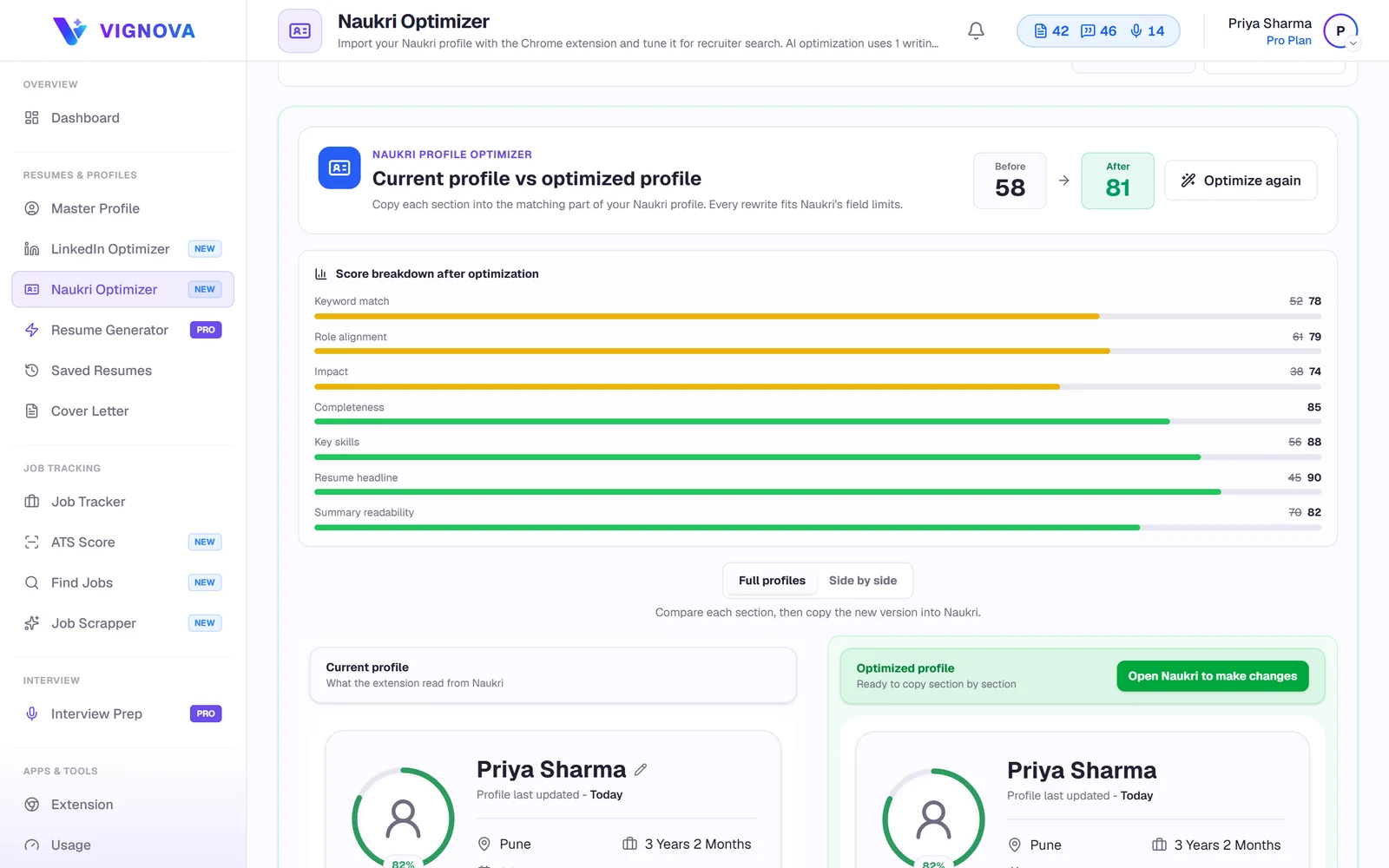
A Naukri profile is not a resume. Recruiters search it by keywords and narrow results by details such as experience and location, so each section has a job to do.
| Section | Limit Vignova checks | What makes it work |
|---|---|---|
| Resume headline | 250 characters | Your role or target role, two to four core skills and your domain. Not a list of personal qualities. |
| Key skills | 50 skills | The skills you want to be found for, spelled the way postings spell them, and consistent with your employment and projects. |
| Profile summary | 1,000 characters | Who you are professionally, your strongest evidence and the roles you are looking for. |
| Employment job profiles | 4,000 characters per role | What you were responsible for and what you achieved, with the tools you used. |
| Project details | 1,000 characters per project | The problem, your role, the tools and the outcome. |
| IT skills, education and career profile | Naukri's own fields | Complete, accurate and consistent with the rest of the profile. |
Naukri can change its field limits. Check the counter on Naukri's form when you paste a rewrite.
Naukri has no public way for other services to read your profile, so the Vignova Chrome extension reads it from the page, in your own browser, when you ask it to.
Add the Vignova extension to Chrome and sign in with your Vignova account.
Open the Naukri Optimizer in Vignova and choose Scan Naukri profile. Your Naukri profile opens in a new tab.
Sign in to Naukri in that tab if asked. The extension reads each profile section and takes you back to the results.
See the overall score, seven area scores, the sections that are incomplete and what to fix first. Scanning and scoring are free.
Get a rewritten resume headline, profile summary, key skills, job profiles and project details. A rewritten section is kept only if it does not lower your profile score.
Compare your current profile with the optimized one, copy each section and paste it into Naukri's edit forms.
| Area | Weight | What it looks at |
|---|---|---|
| Keywords | 25% | Skills and terms from your Master Profile that appear on your Naukri profile |
| Completeness | 15% | Which of Naukri's sections are filled in |
| Semantics | 15% | How closely the meaning of your profile matches your Master Profile |
| Impact | 15% | Job profiles and project details that lead with actions and show results |
| Readability | 10% | How easy your profile summary is to read |
| Resume headline | 10% | Length, core skills and what the headline leads with |
| Key skills | 10% | How many key skills you list and how many of your Master Profile skills they include |
Completeness is weighted by how much recruiters rely on each Naukri section:
A 2025 B.Tech computer science graduate applying for backend developer roles. Every fact in the rewrite is already in the candidate's Master Profile.
Looking for a job in IT sector. Hardworking, sincere and quick learner.
B.Tech CSE 2025 | Backend Developer | Java, Spring Boot, SQL, REST APIs | Built a placement portal during internship
Illustrative example, not a real candidate. More patterns for freshers and experienced professionals in Naukri profile headline examples.
Lead the headline with your degree, graduation year and target role. Fill key skills from your coursework, projects and internships, add every relevant project with details, and include your CGPA or percentage in education.
Naukri already shows your total experience, so use the headline for your specialism and strongest skills. Rewrite job profiles to show results, and remove skills you have not used in years.
Recruiters can narrow searches by details such as notice period and location. An outdated notice period or city can keep you out of searches you would qualify for.
Employers, titles, dates and skills should agree with the resume you upload. Build both from one Master Profile so they stay consistent.
Scan a few postings for roles you want with the free resume keyword scanner, and add the skills you genuinely have to your key skills.
Your profile shows when it was last updated. While you are job hunting, review it every few weeks and update it whenever something changes.
Use it for your own profile. The optimizer helps you improve the text you publish on your own Naukri profile. It does not search, message or apply on Naukri for you.
Naukri.com is a trademark of Info Edge (India) Ltd. Vignova is an independent career tool and is not affiliated with or endorsed by Naukri.com or Info Edge (India) Ltd.
Scanning and scoring your Naukri profile are free with a Vignova account and the Chrome extension. AI rewrites are included on the Pro and Premium plans and use one writing credit each time. If a rewrite fails, the credit is returned.
Naukri does not offer a public way for other services to read your profile. The extension reads the profile page open in your own browser, when you start a scan, and sends those sections to your Vignova account.
No. It never asks for your Naukri password and never edits your Naukri profile. You sign in to Naukri yourself, and you paste the changes you choose into Naukri's own forms.
The sections used for optimization: resume headline, key skills, employment and job profiles, education, IT skills, projects, profile summary, accomplishments, career profile and languages. It also reads your name, location, total experience, notice period, the profile completeness figure, the last-updated date and the file name of your attached resume. It does not read your phone number, email address, salary or personal details such as your date of birth.
Vignova keeps headline rewrites within 250 characters, the limit it checks for Naukri's resume headline. Naukri can change its limits, so check the counter on Naukri's form when you paste.
No tool can guarantee that. Recruiter interest depends on the roles, your experience and the market. What optimization does is make your profile complete, clear and consistent in the terms that describe your real experience, which is what recruiters search for.
Yes. For freshers the resume headline, key skills, projects and education carry most of the weight, and the optimizer checks each of them. See Naukri headline examples for freshers and experienced candidates.
Whenever something changes, such as a new role, skill, project or certification, and with a quick review every few weeks while you are job hunting.
No. Vignova is an independent career tool and is not affiliated with or endorsed by Naukri.com or Info Edge (India) Ltd.
Scan your profile with the extension, read the scores for free, and copy the rewrites you want into Naukri.