
Save jobs as you browse
Add a job in the dashboard, or save it from LinkedIn, Indeed and many company career pages with the Chrome extension. The job description is kept and laid out in clear sections so you can reread it before an interview.
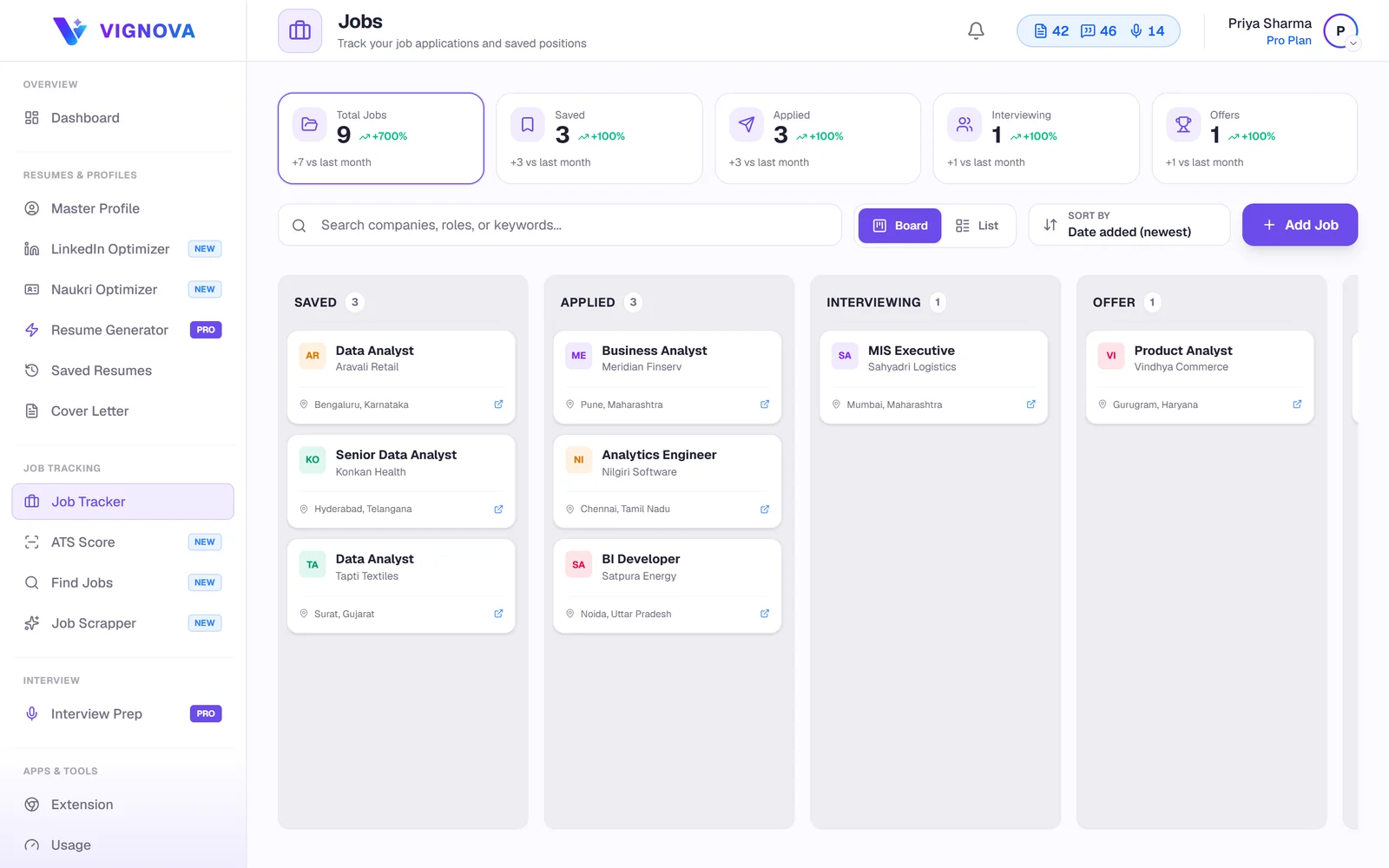
A spreadsheet works until the tenth application. Vignova keeps every job you save, the resume and cover letter you wrote for it, the stage it has reached and the dates that matter, in a list or a board you can drag.
A typical search runs across Naukri, LinkedIn, Indeed, company career portals and referrals from friends. Each has its own list of "applied" jobs, none of them shows which version of your resume you sent, and none of them tells you which applications are going quiet.
The result is familiar: a recruiter calls about a role you do not remember, you tailor a resume for a job you already applied to, or a promising application goes weeks without a follow-up.
One list for every source. The tracker does not care where you found a job. Save it once, and its description, documents, stage and dates stay together.
Add a job in the dashboard, or save it from LinkedIn, Indeed and many company career pages with the Chrome extension. The job description is kept and laid out in clear sections so you can reread it before an interview.
Move each job through Saved, Applied, Interview, Offer and Rejected. Use the list view to scan everything, or the board view to drag cards from one stage to the next.
Add an application deadline and an interview date to any job, so the next thing you need to do is visible when you open the tracker.
Every tailored resume version, cover letter and application email you create for a job is saved with it. You always know what you sent.
From a saved job, open Resume Studio to tailor a resume, run an ATS check or generate interview questions.
Your applications live in your account. Nothing is shared with employers, job boards or anyone else.
The tracker takes seconds to update; the habit is what matters. A routine that works for many job seekers:
For how many applications to aim for and when to follow up, read how many jobs you should apply to, and how to track them.
Saved→Applied→Interview→Offer
A spreadsheet is free and flexible, and for a handful of applications it works well. The difference shows once you apply regularly.
| Spreadsheet | Vignova tracker | |
|---|---|---|
| Adding a job | Copy the details by hand | Save from the job page with the extension, or add in the dashboard |
| Job description | Usually a link that may expire | Saved with the job |
| Resume and cover letter sent | Kept in separate folders | Stored with each job, with every version |
| Stages | Whatever columns you create | Saved, Applied, Interview, Offer, Rejected, as a list or board |
| Cost | Free | Free with an account |
Yes. The tracker is included with a free Vignova account. AI actions you start from a saved job, such as tailoring a resume or writing a cover letter, use credits.
Add it in the dashboard with the company, title, link and job description, or save it straight from the job page with the Vignova Chrome extension, which captures the description for you.
Yes. The tracker is not tied to one job board. Save any job you apply to, wherever you found it, and keep all of them in one list.
Not at the moment. Add the applications that are still active by hand, or save the postings again from the job pages with the extension.
You can add an interview date and an application deadline to each job, so upcoming dates are visible when you open the tracker. Keep using your calendar for reminders.
Only you. Saved jobs, stages and documents are stored in your Vignova account and are not shared or published. See the privacy policy.
Create a free account, save the jobs you are considering, and move them forward as you apply.