
Start from what you have
Upload your current resume as a PDF or import a public LinkedIn profile. Vignova fills in the profile for you to check.
Start from the resume or experience you already have. Vignova keeps it in one career profile, writes a resume for the specific job you are applying to, shows which keywords from the job description are still missing, and lets you edit every line before you download a PDF.
Made for job seekers in India
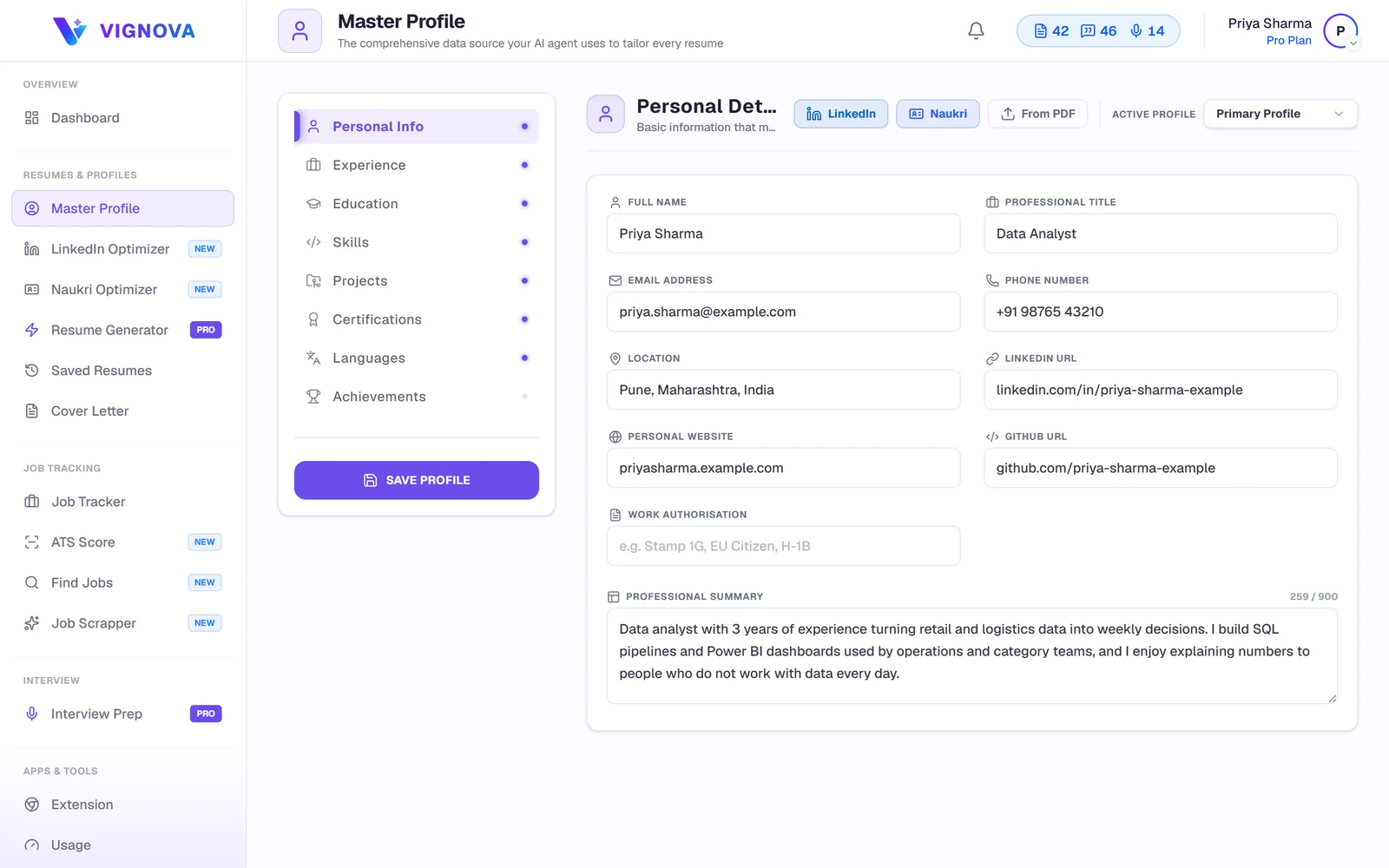
Most resume builders start from an empty template, so each application begins with whatever you remembered to write last time. Vignova starts from a Master Profile that holds your whole history. Every resume can draw on all of it, and nothing you add is lost when one resume leaves it out.
Upload your current resume as a PDF or import a public LinkedIn profile. Vignova fills in the profile for you to check.
Experience, projects, education with CGPA or percentage, certifications, languages, achievements and up to 70 skills, in one place.
Add a job description and Vignova writes a resume that brings forward the experience that posting asks for.
Run an ATS check, change anything in the editor, choose a template and download a PDF.
The first resume takes longest, because you are building the profile. After that, each new application starts at step three.
Upload a PDF resume or paste your public LinkedIn URL, then correct anything the import missed.
Add the roles, projects, internships and skills your old resume had no room for. The profile is your private record, not a document anyone else sees.
Paste the job description, or save the posting from LinkedIn, Indeed and many company career pages with the Vignova Chrome extension.
Vignova rewrites your summary, bullet points and skills for that role, deciding what to bring forward and what to leave out.
See the match score across six areas and the keywords from the job description that the resume does not include yet.
Change any line, reorder sections, switch templates and download a PDF. Each version stays saved with its job.
Upload a PDF and Vignova reads your contact details, work history, education, projects and skills into your Master Profile. If your LinkedIn profile is more current, paste its public URL instead. No import is perfect, especially from two-column or heavily designed resumes, so check dates, job titles and bullet breaks before you generate anything.
When you generate a resume for a saved job, Vignova reads the posting against your Master Profile. It decides which roles, projects and skills to bring forward, turns short profile notes into complete bullet points, and uses the posting's wording where it describes something you have actually done.
The resume writer is instructed never to add an employer, title, date, degree, certification, tool or number that is not in your profile. How resume tailoring works
Master Profile+Job description→Relevant experience→Rewritten bullets and skills→Editable resume
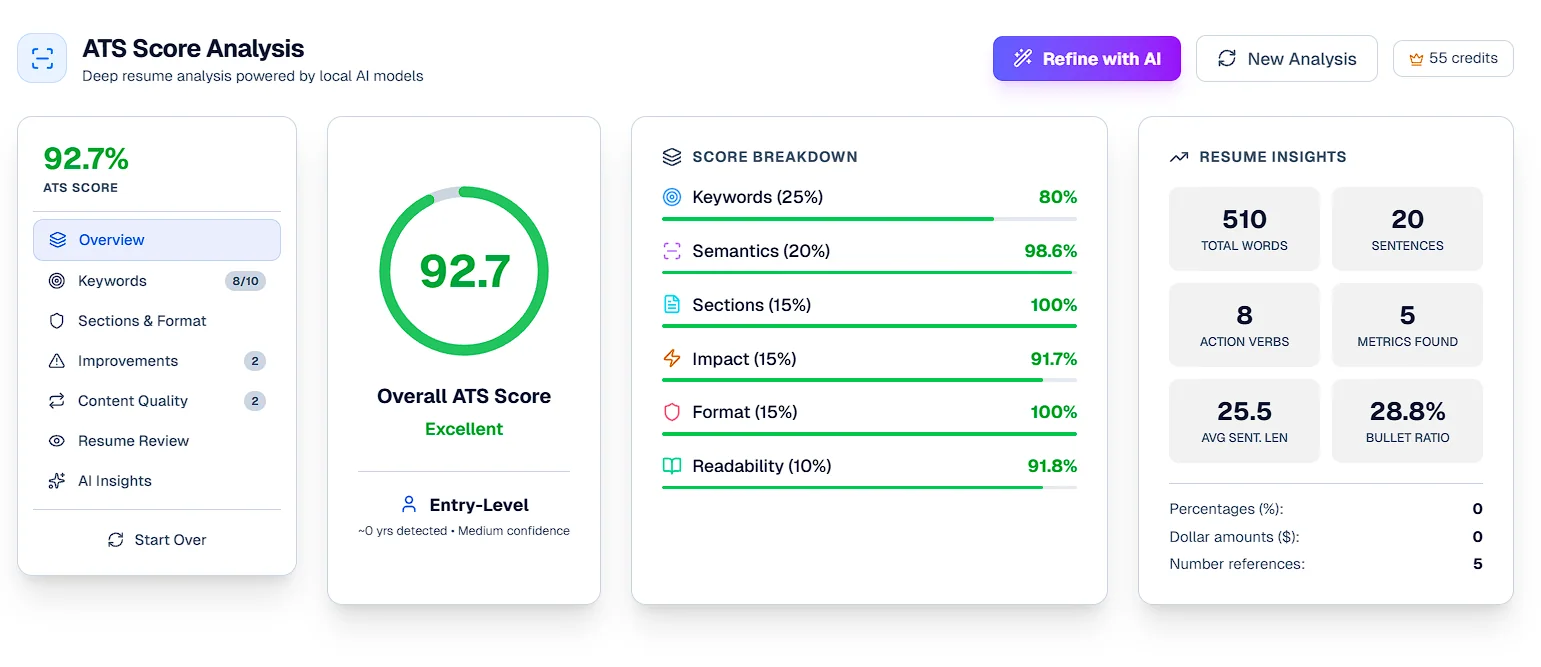
From the editor, run an ATS check of the resume against its job description. The report gives an overall match score, a score for each of six areas (keywords, semantics, sections, impact, format and readability) and a list of improvements with the most important first. Missing keywords are listed so you can add the ones that are true for you.
The score shows how closely this resume matches this posting. It is guidance for editing, not a prediction of whether an employer's software or a recruiter will shortlist you. About the ATS resume checker
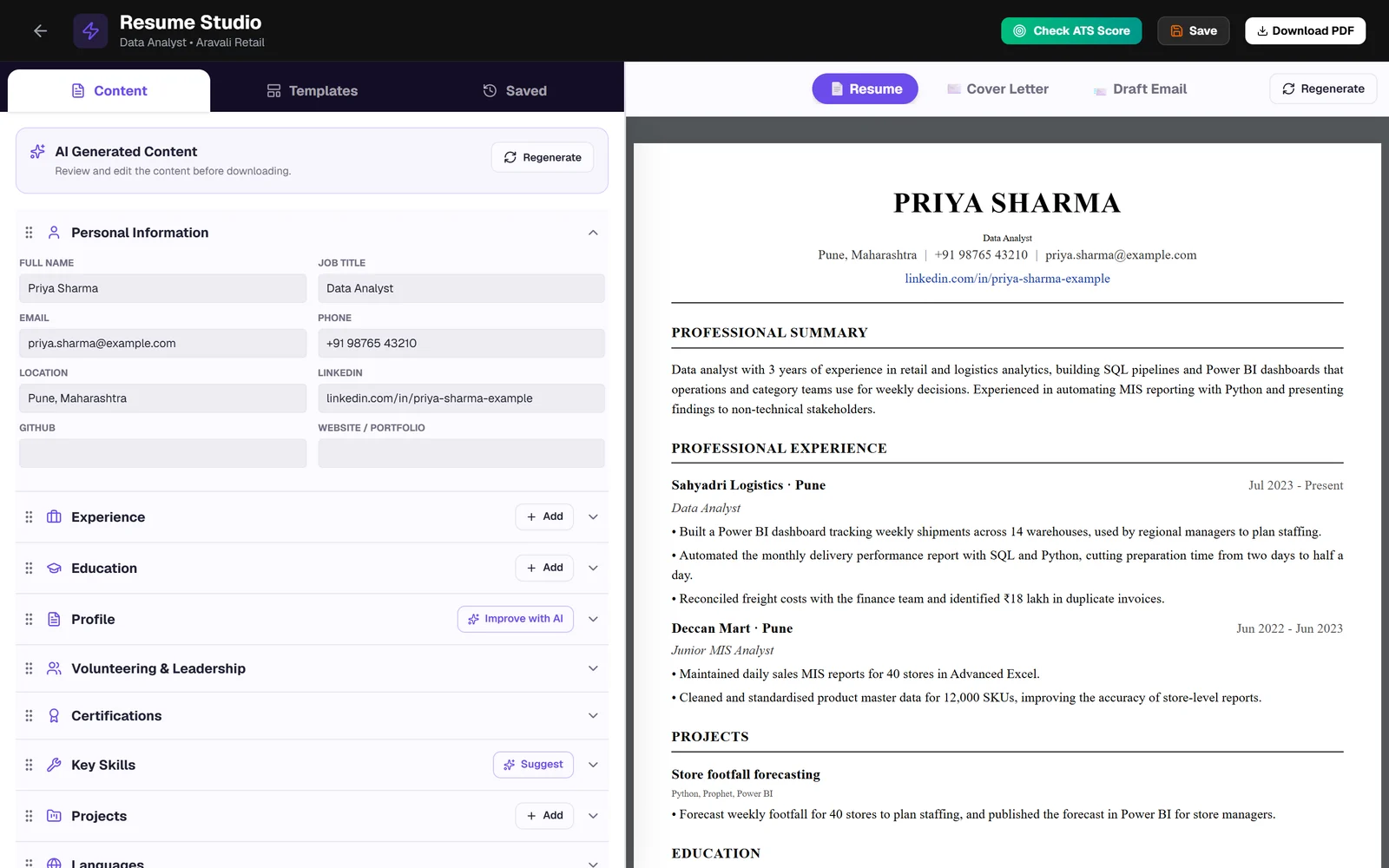
The AI draft is a starting point. In Resume Studio you can change any field, add or remove bullets, reorder sections and add custom sections such as publications or volunteering. Two AI helpers stay optional: Improve with AI offers alternative summaries for you to choose from, and Suggest lists skills the job description mentions that your resume does not.
Choose from 27 resume templates, from plain single-column layouts to more designed options, and download the finished resume as a PDF. Templates marked PRO need a paid plan to download.
For online applications, a single-column layout with standard section headings is the safest choice. The ATS-friendly resume format guide explains why.
A resume that claims skills you cannot discuss in an interview does more harm than a plain one. A useful AI resume builder makes your real experience easier to understand. It should never make that experience bigger than it is.
More on this in can recruiters tell you used AI on your resume?
A B.Com graduate applying for a junior data analyst role. Every fact in the rewrite comes from the candidate's own profile notes.
Did internship in sales team and worked on data and reports.
The profile notes say the intern built an Excel tracker for 12 stores, pulled order data with SQL and shared the trends with a regional manager.
Built an Excel sales tracker covering 12 stores during a two-month internship, using SQL queries to pull weekly order data, and presented the trends to the regional sales manager.
This example is illustrative, not a real user's resume. A rewrite can only be as accurate as your profile: if the store count or the SQL work were not in your notes, they should not appear in your resume.
The same profile works for a campus placement drive, a Naukri application or a role abroad. What changes is what each resume brings forward.
With little work history, B.Tech, B.E., B.Com and MBA students need projects, internships, certifications and CGPA to do the talking. Each resume keeps to what the role asks for, which usually fits on one page.
Years of roles fit in the profile without crowding every resume. For each application, Vignova brings forward the roles and results that match the posting, so a long career does not turn into a four-page resume.
Moving from teaching to instructional design, or from sales to customer success? Tailoring surfaces transferable experience and describes it in the vocabulary of the new field.
Technical postings name specific frameworks, cloud platforms and tools. Keep your full tech stack and project links in the profile, and use the resume keyword scanner to see which ones a posting mentions.
Non-tech postings have keywords of their own, such as Tally, GST, payroll, lead generation or vendor management. The same tailoring and ATS checks apply.
Upload the PDF to Naukri, LinkedIn or a company career site. To improve the profiles themselves, use the Naukri profile optimizer and the LinkedIn profile optimizer.
Write a cover letter for the same job from the same profile, then edit it and download it as a PDF.
Cover letter generator →Keep each resume with its job and move applications from Saved to Applied, Interview and Offer.
Job application tracker →Get practice questions for the role, based on the job description and your profile.
Interview preparation →The free plan includes 3 introductory credits and needs no card. Generating a tailored resume uses one tailoring credit. An application pack, which writes a resume, cover letter and email together, uses one tailoring credit and one writing credit. Paid plans add monthly credits and the PRO templates.
Plan prices are shown in US dollars. At checkout you can pay with PayPal, or with cards, UPI or net banking through Razorpay. Confirm the price shown at checkout before you pay. See plans
Before you spend a credit, finish your Master Profile. A resume can only be as complete as the profile it is written from.
Yes. The free plan includes 3 introductory credits and no card is needed. Generating a tailored resume uses one tailoring credit. Paid plans add more credits each month; see the current plans.
Yes. Upload a PDF and Vignova extracts your details into your Master Profile, or import a public LinkedIn profile instead. Check the imported fields, especially dates and bullet points, before you generate a resume.
It should not. The resume writer is instructed to treat your Master Profile as its only source of facts and never to add an employer, title, date, degree, certification, tool or number that is not in it. Read every draft and remove anything that is not accurate before you send it.
Yes. Every section is editable in Resume Studio with a live preview. You can rewrite bullets, reorder sections, add custom sections, switch templates and save the result as a new version.
Yes, that is what the builder is for. Paste the job description, or save the posting with the Chrome extension, and Vignova writes a version of your resume for that role. See how resume tailoring works.
Yes, as a PDF. Templates marked PRO need a paid plan to download; the rest are available on every plan, including the free plan.
It measures how closely a resume matches one job description across keywords, semantics, sections, impact, format and readability. It is guidance for improving the resume, not a prediction of whether an employer's applicant tracking system or a recruiter will shortlist you. Read what a good ATS score is.
Yes. Add projects, internships, certifications, relevant coursework and your CGPA to the Master Profile. For entry-level roles these often matter more than work experience, and Vignova can bring them forward on each resume.
Yes. Download the PDF and upload it to Naukri, LinkedIn or a company career site. Your Naukri and LinkedIn profiles are separate from the resume, and you can improve them with the Naukri profile optimizer and the LinkedIn profile optimizer.
Your Master Profile and resumes are stored in your Vignova account and are not published anywhere. The privacy policy explains how the information is processed.
Import your current resume, add the job description and review a tailored draft.