
Keep personal details short
Name, phone number, email, city and LinkedIn URL are enough. Date of birth, marital status, father's name and a photo are usually unnecessary unless the employer asks for them.
An ATS check means little without a specific job. Vignova compares your resume with the posting you are applying to, scores the match across six areas and lists the missing keywords and fixes, starting with the ones that matter most.
Paste your resume and a job description. The check finds the skills, tools and repeated terms in the posting and shows which of them your resume already includes. It runs in your browser, so nothing is uploaded or saved.
This is keyword coverage only. For all six areas, AI keyword extraction and ranked fixes, run the full check in Vignova. For a detailed keyword-by-keyword view, use the resume keyword scanner.
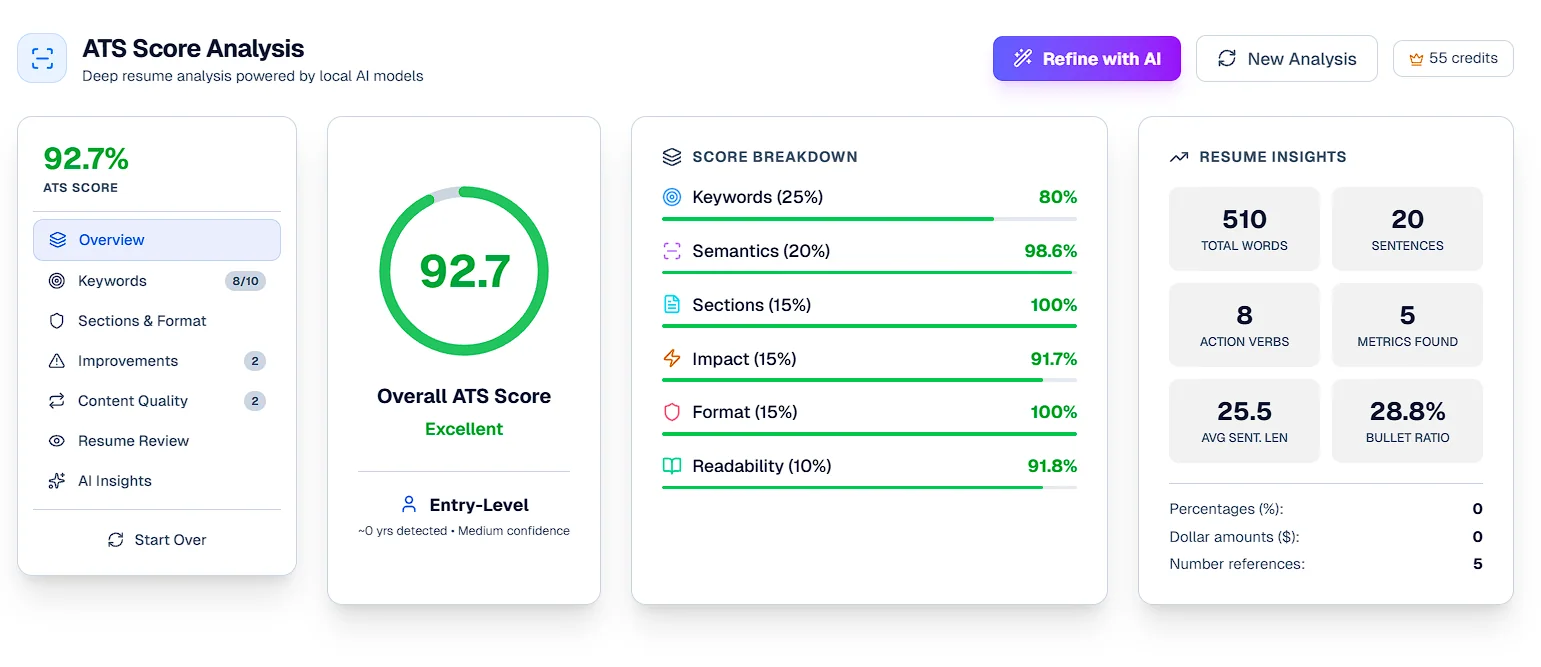
The overall score is a weighted average of six scores. Each one asks a different question of your resume, so a single number never has to explain everything.
| Area | Weight | What it checks | How to improve it |
|---|---|---|---|
| Keywords | 25% | The skills, tools and qualifications extracted from the job description, and whether your resume includes them. | Add missing terms you genuinely have, inside bullets that show how you used them. |
| Semantics | 20% | How closely the meaning of your experience matches the role, beyond exact wording. Parts of the posting with no resume counterpart, such as benefits text, weigh less. | Describe the work the posting asks for in concrete terms. |
| Sections | 15% | Whether the resume has recognisable summary, experience, education, skills and projects sections. | Use standard headings instead of creative ones. |
| Impact | 15% | Action verbs and quantified results: numbers, percentages and scale. | Start bullets with what you did and add results you can back up. |
| Format | 15% | Contact details, consistent date formats, and characters or table layouts that often break text extraction. | Keep contact details in the body, use one date style and avoid tables. |
| Readability | 10% | Sentence length, the share of content in bullet points, and overall length. | Split long sentences and keep each bullet to one idea. |
These are the weights Vignova's ATS analysis uses. Other tools weigh things differently, so scores from different checkers are not comparable.
On paid plans, AI insights add rewritten bullet points and a step-by-step action plan on top of the score. Each report's insights use one tailoring credit.
Prefer to skip the manual edits? Tailor the resume to the job, then check the new version against the same posting.
Upload a text-based PDF, or pick a resume you built in Vignova's Resume Studio.
Select a saved job or paste the full posting. The more complete the posting, the more useful the check.
Vignova extracts the posting's keywords and scores the resume across all six areas.
Start with high-priority improvements. Add a missing keyword only where it describes something you have really done.
Edit the resume or tailor a new version, then run the check again against the same description to see what changed.
Applicant tracking systems store and organise applications, and many let recruiters search and filter them. The often-repeated claim that 75% of resumes are rejected by software before a person reads them has no reliable source, as our look at the 75% myth explains.
What a check can tell you is whether your resume makes your fit for a particular role easy to see, for software and for the recruiter reading afterwards.
Most problems a check finds in Indian resumes come from habits carried over from older formats. These basics apply whether you upload to a job board or a company's career site.
Name, phone number, email, city and LinkedIn URL are enough. Date of birth, marital status, father's name and a photo are usually unnecessary unless the employer asks for them.
Degree, college or university, year and CGPA or percentage, written the same way for every entry, with the most recent first.
Summary, Experience, Education, Skills and Projects. Avoid tables, text boxes and multi-column layouts for anything important.
Export from your editor rather than scanning or photographing a printed page, and name the file with your name, such as Priya-Sharma-Resume.pdf.
List skills once in a skills section, and show the important ones again in experience or project bullets where you used them.
One page is usually enough for freshers. Experienced candidates can use two when every line earns its place.
More detail in the ATS-friendly resume format guide for India.
| Free keyword check (this page) | Full ATS check in Vignova | |
|---|---|---|
| Account | Not needed | Free account |
| What it compares | Skills and repeated terms from the posting against your resume text | AI-extracted keywords, meaning, sections, impact, format and readability |
| Result | Keyword coverage with found and missing terms | Overall score, six area scores, prioritised fixes and resume statistics |
| Where your text goes | Stays in your browser | Processed on Vignova's servers and saved to your account |
| AI insights | Not included | Optional on paid plans, one tailoring credit per report |
The keyword check on this page is free and needs no account. In Vignova, the full six-area ATS check is included with a free account. AI insights, which add rewritten bullet points and an action plan, need a paid plan and use one tailoring credit per report.
The free keyword check runs in your browser: the text you paste is not uploaded or saved. A full check in Vignova is processed on Vignova's servers and the report is saved to your account, so you can compare versions for the same job.
There is no universal pass mark. A score is most useful for comparing versions of your resume against the same job description and for finding the high-priority fixes. Read what a good ATS score is for how to interpret the ranges.
No. The score measures how closely the resume matches one posting. Who gets shortlisted depends on the other applicants, the recruiter, timing, location and much more that no resume checker can see.
In Vignova you can upload a PDF or check a resume you built in Resume Studio. Make sure the PDF contains selectable text: a scanned image of a resume cannot be read by most systems. For the free check on this page, paste the resume text.
Yes. Copy the full job description from the posting, including responsibilities and requirements, and paste it in. With the Chrome extension you can also save postings from LinkedIn, Indeed and other job pages straight to Vignova.
Yes. The full check extracts keywords from whatever the job description asks for, whether that is GST filing, recruitment, lead generation or plant maintenance. The free keyword check on this page also recognises common finance, HR, sales, marketing and operations skills.
They measure different things. The free check compares your resume with skills and repeated terms from a fixed list, entirely in your browser. The full check uses AI to extract the posting's keywords and then weighs five other areas, so the two numbers are not comparable.
Upload your resume, add the job description and see all six scores with a ranked list of fixes.